生活
爱在七夕
 陈燮函 发表于2023-07-25 浏览375 评论0
本篇文章已加密,请输入密码后查看。

生活
强迫症折腾照片
陈燮函 发表于2023-07-25 浏览422 评论0
最近整理了下个人相片,共计差不多2W张。想着更新下错误exif信息,并重新按拍摄日期重命名。需要解决的主要问题如下:
格式混乱,除jpg、mp4外还有png、3gp、tif、wmv、vob、tts等其他格式,不包含Exif信息;
部分微信相片视频是13、10位和其他混乱的时间戳命名;
部分照片和视频用数码相机拍摄日期时间设置错误。
工作
用R画图
陈燮函 发表于2023-07-25 浏览326 评论0
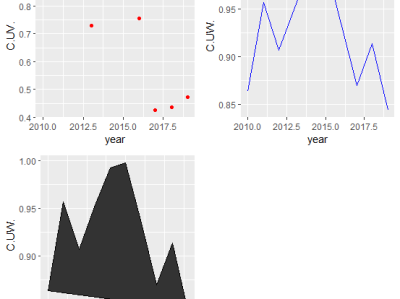
不同类型格式图形合并到一个图形
需要使用ggpubr包的ggarrange功能
library(ggplot2)
library(ggpubr)
data1=read.csv("d:\\2.csv")
p1=ggplot(data1)+geom_point(aes(year,C.UV.),colour="red")
p2=ggplot(data1)+geom_point(aes(year,C.UW.),colour="blue")
生活
新电脑装win7
陈燮函 发表于2023-07-25 浏览468 评论0
近期,因为各种原因对几台Win10电脑进行了降级。总结注意事项和遇到的坑。
BIOS设置
Secure Boot 设置为Disabled【禁用启动安全检查,这个最重要】
生活
用着还不错的软件
陈燮函 发表于2023-07-25 浏览343 评论0
学习
学习过的软件
陈燮函 发表于2023-07-25 浏览276 评论0
C
读书时,接触的第一门计算机语言。
Spss\Matlab
SPSS是读书时的必修课,Matlab是选修课,专业统计、数学类软件。
VB.net
刚工作时用来制作过几个小软件,但制作的软件依赖 .NET Framework,后来就转用移植难度较小的VB了。
贫困调查录入★综合数据处理★住户处Framework20
VB
入门非常简单的软件,可视化界面。随随便便就能生成一个exe程序。用它作过许多工作辅助小程序。
工作
工作常用
陈燮函 发表于2023-07-25 浏览333 评论0
【1】结构调整涉及指标
年报:3-4,205,3701-3706,3711,3712,3735,3745,3751,3781,3782,3784-3786,3821,3831,3861-3863,3871-3876,3881-3883,3891,3900,3907-3910,3920,3941,3945-3947,3955-3957,4202,4203, 4241,4251,4261,4271,4285,4311,4321
学习
vba操作VCF、有效性等
陈燮函 发表于2023-07-25 浏览243 评论0
VCF导入、精简:
Sub inputVcf() '放在sheet1用于导入
    Application.ScreenUpdating = False
    Sheet1.Select
    Cells.Delete
    s = InputBox("输入vcf文件路径", "导入vcf")

    If s = "" Then Exit Sub
    Application.CutCopyMode = False
    With ActiveSheet.QueryTables.Add(Connection:="TEXT;" & s, Destination:=Range("$A$1"))
        .Name = "00001"
        .FieldNames = True
        .RowNumbers = False
        .FillAdjacentFormulas = False
        .PreserveFormatting = True
        .RefreshOnFileOpen = False
        .RefreshStyle = xlInsertDeleteCells
        .SavePassword = False
        .SaveData = True
        .AdjustColumnWidth = True
        .RefreshPeriod = 0
        .TextFilePromptOnRefresh = False
        .TextFilePlatform = 65001
        .TextFileStartRow = 1
        .TextFileParseType = xlDelimited
        .TextFileTextQualifier = xlTextQualifierNone
        .TextFileConsecutiveDelimiter = False
        .TextFileTabDelimiter = False
        .TextFileSemicolonDelimiter = False
        .TextFileCommaDelimiter = False
        .TextFileSpaceDelimiter = False
        .TextFileColumnDataTypes = Array(1)
        .TextFileTrailingMinusNumbers = True
        .Refresh BackgroundQuery:=False
    End With
    For i = UsedRange.Rows.Count To 1 Step -1
        If Left(Cells(i, 1), 2) = "EN" Or Left(Cells(i, 1), 2) = "BE" Or Left(Cells(i, 1), 2) = "N:" Or Left(Cells(i, 1), 2) = "VE" Then
            Rows(i & ":" & i).Delete
        End If
    Next
    UsedRange.Replace "*:", ""
    m = 0
    n = 3
    j = 1
    For i = 1 To UsedRange.Rows.Count
        If IsNumeric(Left(Cells(i, 1), 1)) = False Then
            m = m + 1
            Cells(m, 2) = Cells(i, 1)
            n = 3
        Else
            Cells(m, n) = Cells(i, 1)
            n = n + 1
        End If
    Next
End Sub

Sub setVcf() '放在sheet2用于生成
    Application.ScreenUpdating = False
    s = ""
    For i = 1 To UsedRange.Rows.Count
        s = s & "BEGIN:VCARD" & vbCrLf & "VERSION:3.0" & vbCrLf & "FN:" & Cells(i, 1) & vbCrLf
        For j = 2 To 4
            If Cells(i, j) = "" Then

            ElseIf Left(Cells(i, j), 1) = "1" Then
                s = s & "TEL;TYPE=手机:" & Cells(i, j) & vbCrLf
            Else
                s = s & "TEL;TYPE=固话:" & Cells(i, j) & vbCrLf
            End If
        Next j
        s = s & "END:VCARD"
    Next i
    Open "D:\1.txt" For Output As #1
    Print #1, s
    Close #1
End Sub
学习
vb读写xls、数据库文件
陈燮函 发表于2023-07-25 浏览279 评论0
引用ADO Library对xls文件进行修改。
可以在xls文件打开的情况下直接操作,并在Excel或Wps中直接更新。
Private Sub Command1_Click()

    On Error Resume Next
    Dim adoConn As New ADODB.Connection
    Dim adoReco As New ADODB.Recordset
    Set adoConn = New ADODB.Connection

    adoConn.Open "Provider=Microsoft.Jet.OLEDB.4.0;Persist Security Info=False;Data Source=D:/1.xls;Extended Properties='Excel 8.0;HDR=Yes'"
    Sql = "Num int, Name char(20)"
    adoConn.Execute "Create table [D:/1.xls].Sheet1" & "(" & Sql & ")"
    adoConn.Execute "insert into [sheet1$]  values (999,'zichu')"
    adoConn.Execute "insert into [sheet1$]  values (888,'jingyi')"
    adoConn.Execute "UPDATE [sheet1$]  Set  Name='JingYi'  Where Num=888"
    adoConn.Close
    Set adoConn = Nothing

End Sub
学习
随机序列生成
陈燮函 发表于2023-07-25 浏览283 评论0
仅单字符,输入字符串递增时输出结果也递增。
Sub createArr()
    Application.ScreenUpdating = False
    Dim s As String
    s = InputBox("请输入字符串")
    Cells(1, 2) = "开始时间:" & Format(Now(), "hh:mm:ss")
    funArr s
    Cells(2, 2) = "结束时间:" & Format(Now(), "hh:mm:ss")
End Sub

Function funArr(str1 As String, Optional str2 As String = "", Optional m As Long = 1)
    Dim a() As String
    If Len(str1) = 1 Then Exit Function
    For i = 0 To Len(str1) - 1
        ReDim Preserve a(i)
        a(i) = Mid(str1, i + 1, 1)
        str0 = a(i) & Replace(str1, a(i), "")
        If Len(str0) = 2 Then
            Cells(m, 1) = str2 & str0
            m = m + 1
        End If
        funArr Mid(str0, 2) & "", str2 & Left(str0, 1), m
    Next
End Function